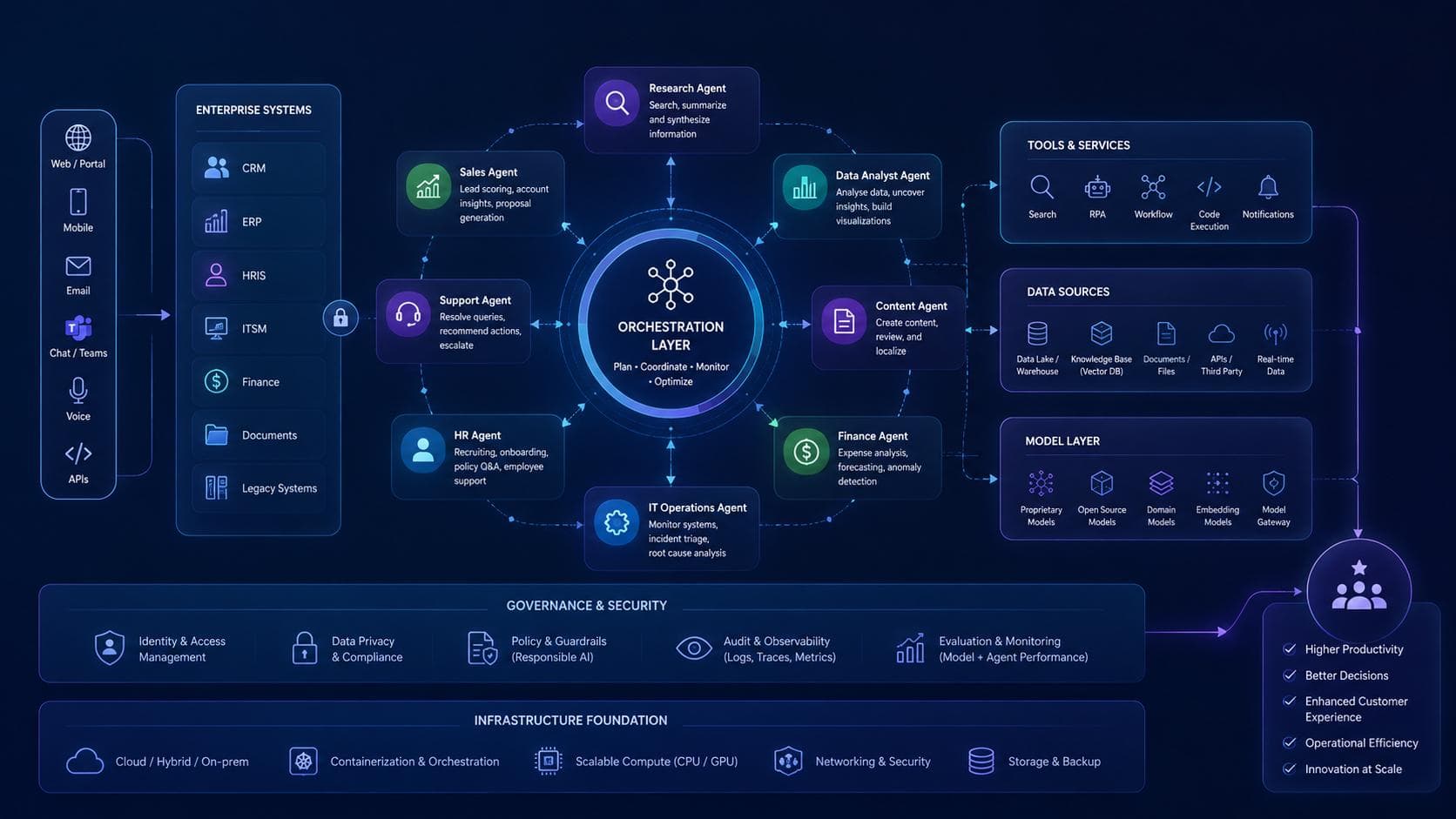
In brief
AI agents are changing how businesses handle support, sales, internal workflows, and customer operations. Learn what they actually do, when to use them, and what to watch for before implementation.
AI agents have moved from technology demos into practical business conversations. The useful question is no longer simply whether an AI model can write a response. It is whether software can safely complete a defined task across the tools a team already uses, and show people what it did.
An agent might read a request, find the relevant policy, retrieve a customer or order record, prepare an update, and either complete an approved action or ask a person to review it. That can reduce repetitive work and shorten handoffs, but it does not make every process a good candidate for automation.
What Is an AI Agent for Business?
An AI agent is a software system that works toward a goal by interpreting information, using permitted tools, and responding to the result. A business agent may combine a language model with company data, APIs, workflow rules, and human approval steps.
That is different from a basic chatbot, which typically answers questions within a conversation. An agent may also take an action, such as creating a CRM task or preparing an order-status update. Those actions should be restricted to the permissions the workflow requires and recorded so the business can review them.
The term “agent” covers a range of systems. Some only recommend the next step; others can carry out a limited sequence of actions. Define the level of autonomy explicitly instead of assuming every agent should operate independently.
Business Benefits: What to Measure
The potential benefits are practical rather than automatic. An agent may help a business:
- Reduce time spent searching for information or copying it between systems.
- Respond to common customer or employee requests more consistently.
- Keep records, handoffs, and follow-up tasks up to date.
- Give staff more time for exceptions, judgment, and relationship-based work.
- Handle workload peaks without adding the same amount of repetitive processing.
Set a baseline before launch so the team can test whether those benefits occur. Useful measures include average handling time, backlog, first-response time, rework rate, escalation rate, task completion accuracy, and customer or employee satisfaction. Track quality and safety alongside speed; a faster workflow is not a success if it creates more incorrect actions.
Real-World AI Agent Applications
The following are illustrative workflows, not claims about a particular company's results. Each example pairs agent assistance with a clear boundary for human decision-making.
Customer service and order support
An ecommerce support agent can identify an order, check approved shipping or return information, draft an answer, and categorize the case. A business might initially let it handle only routine “where is my order?” questions using verified order data, while refund exceptions and complaints go to a person.
The team can measure response time, correct-resolution rate, transfers to human agents, and customer satisfaction. The agent should not invent delivery dates or promise a refund when the relevant policy or order status is missing.
Sales operations and lead response
A sales agent can summarize an inbound enquiry, match it to a product or service, check qualification criteria, and create a follow-up task in the CRM. It can prepare a tailored first response for a salesperson to approve, rather than sending messages or making pricing commitments without review.
Track whether leads are routed correctly, how quickly they receive a response, and whether sales staff find the summaries useful. Keep outreach aligned with consent, company policies, and applicable privacy requirements.
Invoice and document processing
In finance operations, an agent can extract fields from an invoice, compare them with purchase-order or vendor records, flag missing information, and prepare an item for approval. A deterministic validation step can check totals and required fields before anything enters the accounting system.
Exceptions such as mismatched amounts, unfamiliar vendors, or changed payment details should be sent to an authorized employee. The goal is to reduce manual data entry, not to let a model approve or pay invoices on its own.
Employee IT and HR help desks
An internal agent can answer routine questions from approved policy documents, collect the details needed for a service request, and open or update a help-desk ticket. For example, it might guide an employee through a standard access request while routing unusual permissions to the IT team.
Use source-linked answers and current documents. Access to HR, identity, or employee records should be limited to what is necessary, and confidential issues should be routed to the appropriate team rather than exposed in a general chat.
Manufacturing and field service
A maintenance assistant can search equipment manuals, summarize recent service records, and prepare a checklist for a technician. It may help identify relevant instructions faster, but a qualified person should verify safety-critical steps and decide whether equipment is safe to operate.
Start with read-only access to approved documentation. Only consider writing to maintenance systems after technicians have validated the recommendations and the business has defined an auditable approval process.
Operations and appointment coordination
A scheduling agent can collect availability, check permitted calendar slots, suggest options, and prepare booking changes. A clinic, consultancy, or service company could use this to reduce back-and-forth while leaving clinical, eligibility, or priority decisions to qualified staff.
Connect the agent only to the calendars and records it needs. Make cancellation rules, time zones, confirmation messages, and failure handling explicit before allowing it to change appointments.
When an Agent Is a Poor Fit
AI agents are usually a poor first choice when the process has no agreed owner, depends on incomplete or contradictory data, or changes unpredictably from case to case. A standard integration or rules-based automation may be more reliable and less expensive when the task is fully deterministic.
Be cautious with workflows involving medical, legal, employment, credit, or other high-impact decisions. An agent can help organize information or prepare a draft, but a qualified and accountable person should make decisions that require professional judgment or have significant consequences.
Risks and Guardrails to Plan For
An agent can misunderstand a request, retrieve outdated information, or take an unintended action if its tools and permissions are too broad. Business safeguards should include:
- Least-privilege access: Give the agent only the data and actions required for its assigned task.
- Approval gates: Require a person to approve sensitive, irreversible, financial, or customer-impacting actions.
- Defined boundaries: Specify what the agent must refuse, when it should ask a clarifying question, and when it must escalate.
- Reliable information: Use maintained, access-controlled sources and show citations or records where practical.
- Testing and monitoring: Test normal cases, edge cases, and failure paths; review outcomes after launch.
- Auditability: Record relevant inputs, retrieved sources, proposed actions, approvals, and results in line with retention and privacy policies.
- Fallbacks: Make it easy for users to reach a person and ensure the workflow can continue if a model or connected service is unavailable.
Treat user-provided text and documents as untrusted input. An agent should not follow instructions found in a document or message that attempt to override its business rules or access controls.
A Practical Rollout Plan
- Choose one bounded workflow. Look for frequent, repetitive work with clear inputs, an identifiable owner, and manageable consequences if the agent needs to escalate.
- Map the current process. Document the systems involved, decision rules, exceptions, data permissions, and existing service levels.
- Set a baseline and success criteria. Include quality, time, cost, user experience, and safety measures; decide what would stop or roll back the pilot.
- Build the smallest useful version. Start with information retrieval or draft recommendations. Add actions only when the earlier stage is reliable.
- Test with realistic cases. Include ambiguous requests, missing data, unauthorized actions, unusual records, and unavailable integrations—not just ideal examples.
- Pilot with human review. Give a small group clear instructions, an escalation route, and a way to report errors.
- Review evidence before expanding. Compare results with the baseline, investigate failures, and update policies and training before adding workflows or permissions.
How to Estimate the Value
Estimate value from the workflow, not from a broad promise about AI. A simple starting point is:
Potential net value = verified time or operating cost saved + measurable service improvement - implementation and ongoing operating costs
Include integration, data preparation, model usage, security review, monitoring, staff training, maintenance, and human review in the costs. Use observed pilot results and conservative assumptions. If the agent shifts work to a reviewer or creates extra corrections, include that effort too.
Questions to Ask Before Investing
- Which specific task will the agent complete, and who owns the process?
- What systems and data will it need, and what is the minimum access required?
- Which actions can it take, and which require a human approval?
- How should it handle uncertainty, missing information, or service outages?
- How will you test accuracy, privacy, security, and policy compliance?
- What baseline and measurable result would justify continuing the pilot?
- Who will maintain the connected tools, knowledge sources, and escalation rules?
Frequently Asked Questions
Do AI agents replace business software or existing automation?
Usually not. Agents work alongside systems such as CRMs, help desks, and accounting platforms. For predictable steps, conventional rules and integrations can remain the more dependable option; an agent can help interpret less structured requests or coordinate work around them.
Should an AI agent be allowed to act without approval?
Only for low-risk actions with clear rules, limited permissions, reliable data, and tested failure handling. Start with recommendations or draft actions, then expand autonomy only when measured results and governance support it.
How can a business tell whether an AI agent is working?
Compare the pilot with a pre-launch baseline. Measure completion quality, processing time, escalations, rework, user satisfaction, and total operating cost. Review errors and near misses as well as successful cases.
The Smart Business Approach
AI agents can be useful when they fit a real workflow, have access only to the information they need, and know when to hand work to a person. Start small, measure outcomes honestly, and expand only when the agent makes the process better without reducing accountability.
At NuiCloud Technologies, we help businesses plan and build practical AI and automation workflows around their operations. Contact our team to discuss a focused use case and a responsible way to evaluate it.
You Might Also Like
 AI & Automation
How Small Businesses Can Use AI in 2026: Practical Use Cases and Safe First Steps
5 min read
 AI & Automation
What Is the Cost of AI Development in India in 2026? Chatbots, Automation & Custom AI
8 min read
 ERP & Education Technology
Odoo ERP Implementation Cost in India: Pricing, Modules and Benefits
7 min read